
AI platform for digital adoption & knowledge lifecycle
Click! AI. Done✔The AI platform that lets your employees and customers master any process – in software, on forms or at the machine. Capture knowledge once, let it work everywhere: as a guide, as a chatbot answer, inside the AI assistant.
- Learning in the flow of work – guided in the real system, in over 50 languages.
- Faster onboarding for customers and employees, without training marathons.
- Up to 60% fewer support tickets thanks to AI self-service around the clock.
Click "Receipts" in the menu on the left.
This is exactly how readyplace guides your employees and customers through every process: in the real system, step by step, at their own pace.
 As seen in the DATEV Help Center
Large and small companies and organisations across Germany trust readyplace.














- 6 million+click tutorial viewsacross all customers and industries
- 8,000+click tutorials in usefrom a wide range of industries
- 90%+five-star ratingscustomer survey at the end of tutorials
- up to 60%fewer support ticketsthrough 24/7 self-service
What our customers say about readyplace
- 5 / 5
More clarity. Less time spent.
„Users found the combination of image and text in the click tutorials clear and easy to understand. They were confident they were doing the right thing and therefore faster in getting it done. 91% of the more than 400 DATEV users involved gave 5 out of 5 stars.“
- 5 / 5
More efficient customer onboarding
„I know of no other way to show our customers the software interface and processes so quickly and easily. Feedback from our customers confirms that the results meet expectations and that we have taken an important step towards self-service. The AI support in particular has helped us enormously.“
- 5 / 5
High user adoption and confidence
„Real digitalisation only succeeds when employees actually master the tools. With readyplace click tutorials we seamlessly combine training and application – for confident, capable use from the very first click.“
- 5 / 5
Effective knowledge transfer. Better support.
„We were positively surprised at how quickly readyplace paid off for Treukontax. In my opinion there is no better way to present simple and complex processes than with click tutorials. I have never received so much, and exclusively positive, feedback from our staff.“
How digital adoption works with readyplace
The readyplace knowledge cycle
readyplace treats process knowledge as a living system: captured with AI, managed centrally, delivered where questions arise, and improved based on real usage. Outdated knowledge surfaces automatically.
The cycle runs through all four phases and improves two things with every pass: how knowledge is delivered and how good it is.
- The result?
- More efficiency and significantly lower costs in onboarding, service and helpdesk, software documentation and software rollouts.
- Who is readyplace for?
- Every industry. Our customers include tax firms, software vendors, construction companies, municipalities and auditors.
- Which use cases?
- Onboarding employees and customers, internal and external support, process documentation and software rollouts – wherever people need to use software confidently.
Capture & update – click once, the AI documents
Your teams run a process once with the readyator, the AI turns it into an interactive guide – automatically translated into every language. Existing documents, screenshots and videos are included as well. Far faster than text, PDF or video, and at the user's own pace: "Answer every question only once."
More on software rollouts with readyplace →
AI-assisted capture
Run a process once – readyplace records every click and turns it into an interactive guide. Platform-independent, without touching your software.
Translation into over 50 languages
Content is translated automatically and stays in sync when things change, including accessible languages.
GDPR-compliant & secure
Hosted in Germany with the highest data protection standards. Sensitive data in recordings can be fully masked.
Manage – roles, security, categories and languages
Manage guides, documents and articles in one place. Use roles and access permissions to decide who sees which knowledge: internal only or your entire ecosystem. All in a dedicated admin dashboard – clear, secure and reliable.
How tax firms relieve their teams →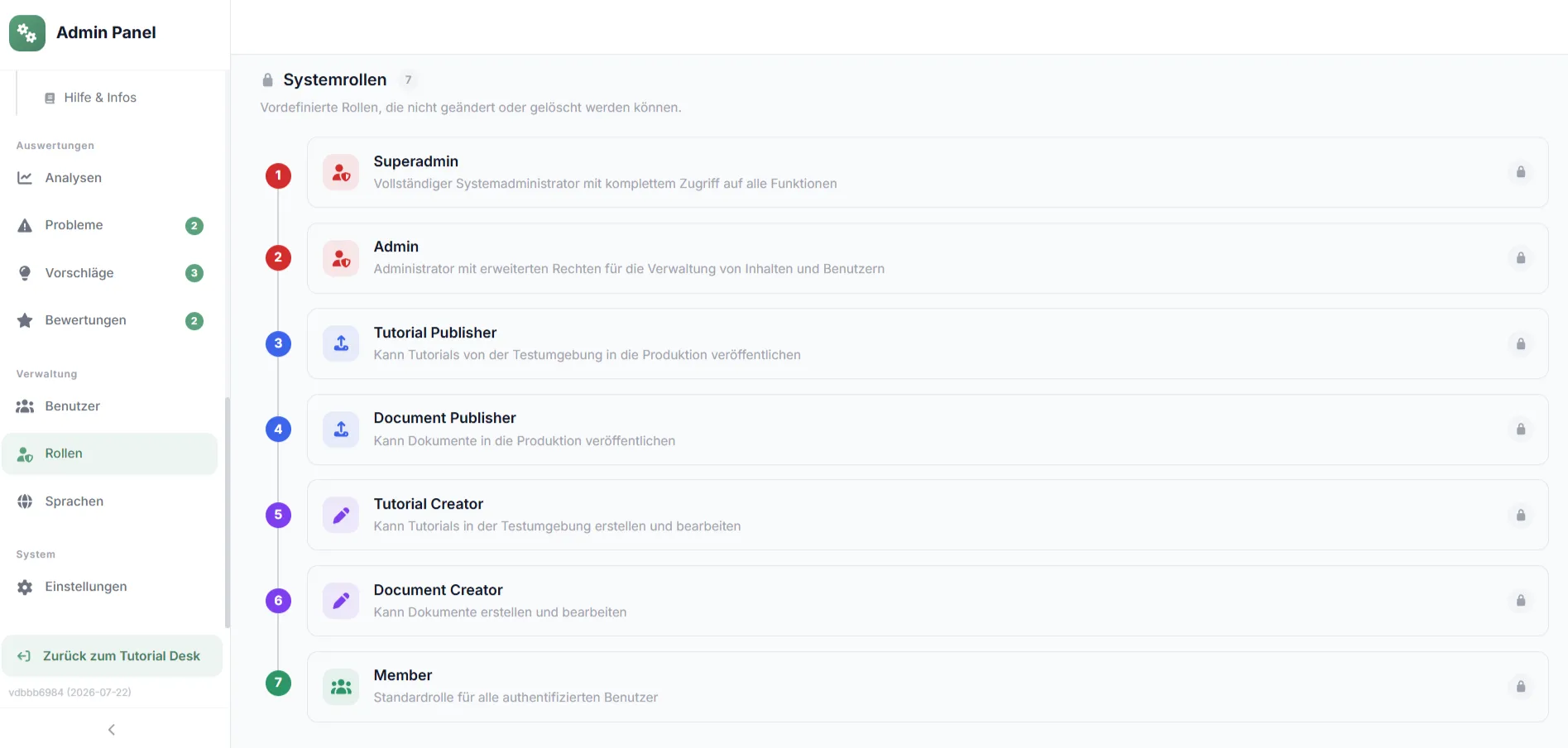
Role management
Assign clear roles to your team and control access permissions to content. Every responsibility stays clearly defined.
Content management
Review content in a staging environment before releasing it. Manage guides, documents, categories, tags and glossary terms – all in one admin dashboard.
Multilingual
Offer the same content in several languages and manage all versions centrally – for teams and customers worldwide.
Deliver – self-service, AI chatbot and AI assistants
Good knowledge is useless if nobody finds it. That is why readyplace makes it accessible exactly where questions arise: in the self-service desk, embedded in the help centre, as an AI chatbot answer or via the MCP connector directly inside your users' AI assistant. Every answer is one click away and always current.
More on the self-service desk for your helpdesk →How do I upload a receipt?
There is a guided walkthrough for that: "Upload a receipt" takes you through it in four steps – in the real system, at your own pace.
Sources
- Which file formats?
- Who can see receipts?
How do I upload a receipt?
Self-service desk (internal & external)
Provide knowledge to employees via an internal desk and to customers via a public desk – by link, QR code or help-centre embedding, on any device.
AI chatbot
Answers questions exclusively from your approved content and links to the matching step – no invented information.
AI assistants & single source of truth
All processes in one place, searchable and current. Via the MCP connector this knowledge is also available to AI assistants such as Claude or ChatGPT.
Analyse & improve – knowledge that grows with you
Delivering knowledge is not the end but the beginning. readyplace shows you how your content is really used, collects direct user feedback and turns it into concrete improvements. One-off knowledge becomes a living cycle that grows more valuable with every pass.
More on onboarding with readyplace →
Analyse
The admin dashboard shows usage, search queries and chatbot input. You see which knowledge is missing and which is outdated.
Collect user feedback
Users give ratings, suggestions and problem reports directly in the content. You see this feedback in the admin area and work it in.
Improve
With structured feedback and clear usage data you optimise your content quickly – and perfect your knowledge transfer.
Your benefits at a glance
- Documentation in record time. Process knowledge captured with AI and efficiently managed as curated knowledge.
- A relieved helpdesk. AI self-service for customers and employees around the clock – up to 60% fewer tickets.
- Lower costs, more scale. Significant time and cost savings while knowledge transfer grows.
- Faster employee onboarding. New colleagues are ready much sooner.
- Customer onboarding time halved. Shorter time-to-value for new customers.
- More revenue, less churn. Higher trial-to-paid conversion and a superior user experience.
Integrations
Fits into your system landscape
readyplace documents any software from the outside and delivers tutorials where your users are. No plugin, no interface into your application – just sign-in via your directory and embedding where help is needed.
- Single sign-onMicrosoft Entra ID, SAML 2.0, Keycloak, LDAP – roles from your groups.
- Help-centre embeddingTutorials via iframe in portal, intranet or software – as in the DATEV Help Center.
- SCORM & PDFExport for Moodle, ILIAS and other LMS, or as PDF for print and archive.
- AI chatbotAnswers only from your approved tutorials, with a link to the matching step.
- MCP connectorYour tutorial knowledge for AI assistants such as Claude or ChatGPT – in pilot operation.
- TranslationOver 50 languages with DeepL and Google, translations stay in sync when content changes.
We look forward to hearing from you!
Get in touch and book a free presentation. We will show you how your organisation can benefit from readyplace.
Free live demo and consultation